
Triathlon + Duathlon Tracker


৩+ হিচাপে মূল্যাংকন কৰা হৈছে
info
০+
ডাউনল’ড

৩+ হিচাপে মূল্যাংকন কৰা হৈছে
অধিক জানক


এই এপ্টোৰ বিষয়ে
Needs a Wear OS watch. The phone app is only the bridge to Health Connect.
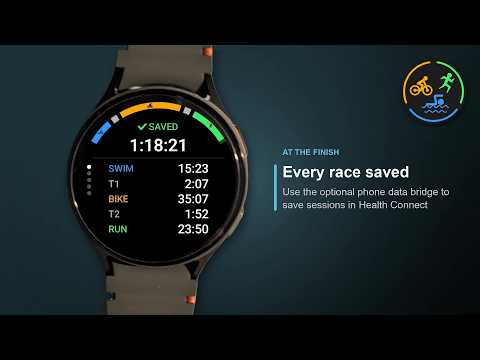
Your whole race as one recording: swim, bike and run with the transitions in between, in the order your race has them.
Triathlon + Duathlon Tracker records a triathlon, a duathlon (run-bike-run or bike-run-bike) or an aquathlon (run-swim-run or swim-run). At every change the back button starts the next segment; a bar along the top shows how far through the race you are. With a target time the watch shows live whether you are ahead of it or behind.
Use this tracker for races and for brick sessions. Want it customized? Feel free to contact us.
Features:
- The order of the legs shown as pictures
- Distances: super sprint, sprint, olympic, middle and long distance for the triathlon, sprint and standard for the duathlon, standard for the aquathlon – or your own distance per leg, or none at all
- The app remembers your last race, distance and target time
- Transitions T1 and T2 timed as segments of their own, or switched off in the settings
- Target time: the line on top shows how far ahead (green, -1:20) or behind (red, +0:45) you are
- Per segment: time, distance, heart rate and the tempo each sport counts in – swim per 100 m, bike in km/h, run per km (or yards and miles)
- The swim's distance from GPS, filtered for a wrist that is under water most of the time
- Pressed the back button too early? "Previous segment" in the pause menu takes the change back
- No tap starts or stops a race: press the side button or hold the screen for a second, so water on the display cannot end it
- Summary after saving, page by page: times, your result against the target per segment, distances, tempos, average heart rates
- From the watch's own sensors only: no swim strokes, no bike power or cadence
- The phone app can share each leg's GPS track as a GPX file with an app you choose
- History on the watch with your newest 100 sessions
- Average and maximum heart rate in the history
Settings on the watch: transitions as segments of their own (on or off), units (automatic, metric or imperial), max heart rate for the zone colours.
How to use:
1. Pick the race, its order and its distance, then a target time if you want one; the green arrow button (or the side button) goes on
2. Press the side button or hold the screen for a second to start
3. At every change press the back button (without one: hold the lower half of the screen); the line at the bottom names the next segment
4. Stop the same way you started; choose Continue, Previous segment, Save or Discard
Settings and History: the "⋯" at the bottom of the first screen.
Works on the watch alone: your races stay on this watch. A small companion app for the phone comes with it. It writes each saved race to Health Connect on your phone and does nothing else. There a race appears as one session per leg – a swim as open water swimming, a ride as biking, a run as running, each with its distance and calories; a transition counts to the leg after it. It is optional: the watch app works on its own, and neither app uses an internet connection. Your heart rate curve goes to Health Connect too. No ads, no subscription, no account.
Illustrated guide: https://iovion.com/apps/guide/triduathlon
Questions or problems? Please write to us via the contact form.
Your whole race as one recording: swim, bike and run with the transitions in between, in the order your race has them.
Triathlon + Duathlon Tracker records a triathlon, a duathlon (run-bike-run or bike-run-bike) or an aquathlon (run-swim-run or swim-run). At every change the back button starts the next segment; a bar along the top shows how far through the race you are. With a target time the watch shows live whether you are ahead of it or behind.
Use this tracker for races and for brick sessions. Want it customized? Feel free to contact us.
Features:
- The order of the legs shown as pictures
- Distances: super sprint, sprint, olympic, middle and long distance for the triathlon, sprint and standard for the duathlon, standard for the aquathlon – or your own distance per leg, or none at all
- The app remembers your last race, distance and target time
- Transitions T1 and T2 timed as segments of their own, or switched off in the settings
- Target time: the line on top shows how far ahead (green, -1:20) or behind (red, +0:45) you are
- Per segment: time, distance, heart rate and the tempo each sport counts in – swim per 100 m, bike in km/h, run per km (or yards and miles)
- The swim's distance from GPS, filtered for a wrist that is under water most of the time
- Pressed the back button too early? "Previous segment" in the pause menu takes the change back
- No tap starts or stops a race: press the side button or hold the screen for a second, so water on the display cannot end it
- Summary after saving, page by page: times, your result against the target per segment, distances, tempos, average heart rates
- From the watch's own sensors only: no swim strokes, no bike power or cadence
- The phone app can share each leg's GPS track as a GPX file with an app you choose
- History on the watch with your newest 100 sessions
- Average and maximum heart rate in the history
Settings on the watch: transitions as segments of their own (on or off), units (automatic, metric or imperial), max heart rate for the zone colours.
How to use:
1. Pick the race, its order and its distance, then a target time if you want one; the green arrow button (or the side button) goes on
2. Press the side button or hold the screen for a second to start
3. At every change press the back button (without one: hold the lower half of the screen); the line at the bottom names the next segment
4. Stop the same way you started; choose Continue, Previous segment, Save or Discard
Settings and History: the "⋯" at the bottom of the first screen.
Works on the watch alone: your races stay on this watch. A small companion app for the phone comes with it. It writes each saved race to Health Connect on your phone and does nothing else. There a race appears as one session per leg – a swim as open water swimming, a ride as biking, a run as running, each with its distance and calories; a transition counts to the leg after it. It is optional: the watch app works on its own, and neither app uses an internet connection. Your heart rate curve goes to Health Connect too. No ads, no subscription, no account.
Illustrated guide: https://iovion.com/apps/guide/triduathlon
Questions or problems? Please write to us via the contact form.
Triathlon, duathlon, aquathlon on Wear OS: every leg, transition and target time
আপডে’ট কৰা তাৰিখ
বিকাশকৰ্তাসকলে আপোনাৰ ডেটা কেনেকৈ সংগ্ৰহ আৰু শ্বেয়াৰ কৰে সেয়া বুজি পোৱাৰ জৰিয়তে সুৰক্ষা আৰম্ভ হয়। ডেটাৰ গোপনীয়তা আৰু সুৰক্ষা প্ৰণালী আপোনাৰ ব্যৱহাৰ, অঞ্চল আৰু বয়সৰ ওপৰত ভিত্তি কৰি ভিন্ন হ’ব পাৰে। বিকাশকৰ্তাগৰাকীয়ে এই তথ্যখিনি প্ৰদান কৰিছে আৰু সময়ৰ লগে লগে এয়া আপডে’ট কৰিব পাৰে।


নতুন কি আছে
2026-10-25 - 1.01
- New setting "Signals": vibration only (as before), like the watch, or vibration + tone
2026-10-22 - 1.0
- First release
- New setting "Signals": vibration only (as before), like the watch, or vibration + tone
2026-10-22 - 1.0
- First release
৩+ হিচাপে মূল্যাংকন কৰা হৈছে
অধিক জানকএপৰ সমৰ্থন
বিকাশকৰ্তাৰ বিষয়ে
Richard Junggebauer
support@iovion.com
Rendsburger Landstr. 148
24113 Kiel
Germany
+49 177 6456147


