
Android Auto

star
6.35M reviews

Rated for 3+
info
10B+
Downloads

Rated for 3+
Learn more


About this app
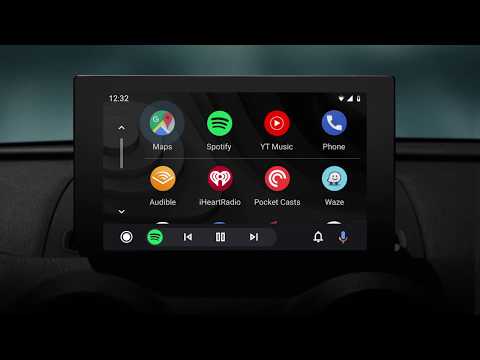
Android Auto is your smart driving companion that helps you stay focused, connected and entertained with the Google Assistant. With a simplified interface, large buttons and powerful voice actions, Android Auto is designed to make it easier to use apps that you love from your phone while you’re on the road.
Just say “Ok Google” to...
• Direct to your next destination using Google Maps or Waze with real-time GPS navigation and traffic alerts.
• Get updates on your route, ETA and hazards in real time.
• Get the Google Assistant to check your calendar for you so that you know where you need to be.
• Set reminders, get updates on the news and check last night’s score.
• Avoid distractions while driving by setting a customised do not disturb message while driving.
• Make calls using the Google Assistant and answer incoming calls with just a tap.
• Access your contacts folder and send and receive messages with the Google Assistant using SMS, Hangouts, WhatsApp, Messenger, Skype, Telegram, WeChat, Kik, Google Allo and many more messaging apps.
• Manage your infotainment system like never before. Listen to your favourite media apps including Spotify, Google Play Music, TuneIn, ABC listen, Pandora, iHeartRadio. Many more music, radio, news, sports news, audiobook and podcast apps are also supported.
The number of compatible apps is always growing. For a full list of compatible apps, go to http://g.co/androidauto
To use Android Auto, you’ll need a phone running Android 6.0 or higher and an active data connection.
Over 400 car models now support Android Auto. To find out if your car display is compatible and how to enable it, check your owner’s manual or contact your car’s manufacturer. Once enabled, use a high-quality USB cable to connect your phone to your car, then launch Android Auto to get going.
Find out more about Android Auto and compatible cars at http://android.com/auto
For support: http://support.google.com/androidauto
Get help from our community: https://productforums.google.com/forum/#!forum/android-auto
Control maps, media and messaging with Gemini while you drive
Updated on
Safety starts with understanding how developers collect and share your data. Data privacy and security practices may vary based on your use, region and age. The developer provided this information and may update it over time.
- No data shared with third partiesLearn more about how developers declare sharing
- This app may collect these data typesLocation, Personal info and 6 others
- Data is encrypted in transit
- Data can’t be deleted


Ratings and reviews
6.29M reviews

Rachel Massaglia
- Flag inappropriate
- Show review history
13 April 2026
Almost every time I use the button on my steering wheel or say "ok, Google" there is no response. The words "How can I help" show up on my vehicle screen, but the color bar doesn't show. Also, if I get anything to record it goes blank and doesn't send the message. Sometimes, it even reads the message back and then goes blank. Very unreliable, and creates a safety hazard because of the multiple attempts needed to process a request.
192 people found this review helpful
Google LLC
3 July 2018
Hi Rachel. Thanks for your feedback. We’d like to understand the issue better and help troubleshooting. When you have a moment, visit our user community https://goo.gl/uJYCRt and tell us more. You can also check out Android Auto FAQ here: https://goo.gl/viJZW4.

Patrick Finnegan
- Flag inappropriate
19 September 2026
I would love to rate this a 5, but connectivity is an issue. Even in cites, it will drop from time to time. Annoying as hell. When it works, its great. To test if it is a signal from the tower issue, I ran it over the same areas with Bluetooth and Spotify and never lost connectivity. And even worse, the drop areas were not consistant. Up, then down, repeat. Arrrgggghhhh.
621 people found this review helpful

Doug Osgood
- Flag inappropriate
- Show review history
11 August 2026
Definitely better than it used to be. Sometimes it still decides you've touched it too many times while driving which is kind of annoying? I get that it's a safety feature, but often it drives me to just get out my phone and do the same task which seems more dangerous? but beyond that it's pretty darn functional. The addition of Gemini now is a definite improvement.
765 people found this review helpful
Google LLC
24 October 2022
Hi Doug. We recommend trying the troubleshooting steps on this FAQ thread here: https://goo.gle/36jpTXs to help with your experience. If the issue still persists, please visit our community for more help: https://goo.gle/2S6zkAg. Thanks!
Rated for 3+
Learn moreApp support
About the developer
Google LLC
support@google.com
1600 Amphitheatre Pkwy
Mountain View, CA 94043
United States
+1 650-253-0000


