
Photo Motion Effects: Animator
Contains adsIn-app purchases

star
586 reviews

Rated for 3+
info
100k+
Downloads

Rated for 3+
Learn more


About this app
Bring your photos to life with motion photos. Animate photos with facial movement and easily create incredible light motion effects using simple editing tools.
Motion Photos is a compact and intelligent live photo animation app for Android. It includes everything you need to edit a photo. It offers a variety of trendy overlays, stickers, and other tools to help you create attractive animations from a simple still image.
Animated photo backgrounds and dynamic photos allow you to easily share your animated artwork on other social media platforms. Using your creativity, you can turn any live photo into a video with just a few clicks with a little creativity and our live photo maker, you can bring your images to life with realistic motion.
You can create cinemagraphs and photo effects. We have included a simple tutorial to help you understand the photo animation and motion photo app. For stunning animations, use a snapshot from your camera or select an image from your gallery.
📄 Main Features of Motion Photos:
✨ Overlays:
Simply put, the best overlays can transform a decent photo into a spectacular moving image. Several free overlays are available in the motion photo app. When creating photo animations and animated photo backgrounds, it is essential to remember that the quality and type of overlays you use are important. That's why Motion Photos provides the best overlays to enhance your animated photos.
🎭 Animated Stickers
You can add animated stickers to your animations to enhance the beauty of your animated photo effects. Many different sticker styles are available to suit various types of animations.
🛠️ Simple Editing Tools:
All the tools in the app are easy to use.
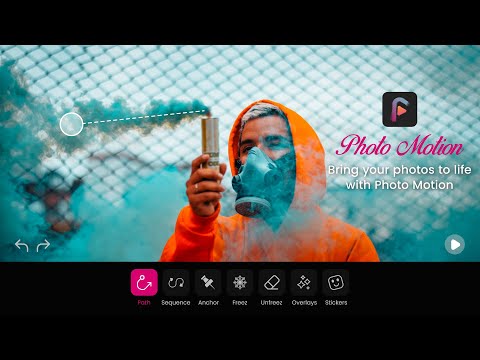
Freeze and unfreeze tools help you choose which parts of the image you want to animate and which parts should remain still.
You can select specific edited areas of the image to remove edits if you change your mind. There is no need to use the undo option to erase a large portion of your editing work.
The path and sequence tools help you choose the direction in which you want the motion to move.
The Anchor tool lets you create animations in which certain parts remain still throughout the entire animation.
The Details tool helps you see which parts of your photo have been edited and the direction of an anchor or motion effect.
▶️ Easy Preview
You can preview your photo at every stage of editing by simply clicking the play button. This allows you to easily undo and redo changes to improve your motion photo graphics.
🎬 Create Animated Photos
Dynamic graphics combined with natural movement and static images introduce a different style of visual storytelling. You can transform a simple, boring image into a creative and colorful animation.
📱 User-Friendly Interface
The interface of the 3D motion photo app is simple and easy to understand. You don't need to be a graphic designer to create unique animated images. A little creativity can bring your photographs to life.
📐 Create Animations in Different Sizes
You can choose the aspect ratio of the animation you create.
📸 High-Quality Resolution
You can easily download your designed animations in high resolution.
🎬 How to Use Photo Motion Effects: Animator?
➢ Select a photo from your gallery to start creating an animation.
➢ Add motion paths to define which parts of the photo should move.
➢ Freeze or unfreeze areas to keep specific parts still.
➢ Enhance your animation with overlays, animated stickers, and creative effects.
➢ Preview your animation in real time and adjust the motion as needed.
➢ Choose your preferred aspect ratio, animation speed and output quality.
➢ Save your animated photo or motion video and share it with friends and followers.
📌 Install now and bring your favorite memories to life with just a few taps! - Turn your still photos into lively animations and engaging videos with ease! Add motion paths, freeze specific areas, enhance images with creative overlays.
Motion Photos is a compact and intelligent live photo animation app for Android. It includes everything you need to edit a photo. It offers a variety of trendy overlays, stickers, and other tools to help you create attractive animations from a simple still image.
Animated photo backgrounds and dynamic photos allow you to easily share your animated artwork on other social media platforms. Using your creativity, you can turn any live photo into a video with just a few clicks with a little creativity and our live photo maker, you can bring your images to life with realistic motion.
You can create cinemagraphs and photo effects. We have included a simple tutorial to help you understand the photo animation and motion photo app. For stunning animations, use a snapshot from your camera or select an image from your gallery.
📄 Main Features of Motion Photos:
✨ Overlays:
Simply put, the best overlays can transform a decent photo into a spectacular moving image. Several free overlays are available in the motion photo app. When creating photo animations and animated photo backgrounds, it is essential to remember that the quality and type of overlays you use are important. That's why Motion Photos provides the best overlays to enhance your animated photos.
🎭 Animated Stickers
You can add animated stickers to your animations to enhance the beauty of your animated photo effects. Many different sticker styles are available to suit various types of animations.
🛠️ Simple Editing Tools:
All the tools in the app are easy to use.
Freeze and unfreeze tools help you choose which parts of the image you want to animate and which parts should remain still.
You can select specific edited areas of the image to remove edits if you change your mind. There is no need to use the undo option to erase a large portion of your editing work.
The path and sequence tools help you choose the direction in which you want the motion to move.
The Anchor tool lets you create animations in which certain parts remain still throughout the entire animation.
The Details tool helps you see which parts of your photo have been edited and the direction of an anchor or motion effect.
▶️ Easy Preview
You can preview your photo at every stage of editing by simply clicking the play button. This allows you to easily undo and redo changes to improve your motion photo graphics.
🎬 Create Animated Photos
Dynamic graphics combined with natural movement and static images introduce a different style of visual storytelling. You can transform a simple, boring image into a creative and colorful animation.
📱 User-Friendly Interface
The interface of the 3D motion photo app is simple and easy to understand. You don't need to be a graphic designer to create unique animated images. A little creativity can bring your photographs to life.
📐 Create Animations in Different Sizes
You can choose the aspect ratio of the animation you create.
📸 High-Quality Resolution
You can easily download your designed animations in high resolution.
🎬 How to Use Photo Motion Effects: Animator?
➢ Select a photo from your gallery to start creating an animation.
➢ Add motion paths to define which parts of the photo should move.
➢ Freeze or unfreeze areas to keep specific parts still.
➢ Enhance your animation with overlays, animated stickers, and creative effects.
➢ Preview your animation in real time and adjust the motion as needed.
➢ Choose your preferred aspect ratio, animation speed and output quality.
➢ Save your animated photo or motion video and share it with friends and followers.
📌 Install now and bring your favorite memories to life with just a few taps! - Turn your still photos into lively animations and engaging videos with ease! Add motion paths, freeze specific areas, enhance images with creative overlays.
Photo animation video maker with music - photo motion effects with music
Updated on
Safety starts with understanding how developers collect and share your data. Data privacy and security practices may vary based on your use, region and age. The developer provided this information and may update it over time.
- This app may share these data types with third partiesLocation and Device or other IDs
- No data collectedLearn more about how developers declare collection
- Data is encrypted in transit
- Data can’t be deleted


Ratings and reviews
562 reviews

Mike
- Flag inappropriate
13 January 2025
Wow !!! This is great just what I want , ideal for a beginner to learn photo animation as it's not easy and takes a great deal if practice Free and practical a great start until you move on to bigger, more comprehensive, highly skilled advanced premium apps .
2 people found this review helpful
CC Publisher
17 January 2025
Thank you so much for using our app! We appreciate your support and hope that you will continue to use it in the future.

Exotic Seduction
- Flag inappropriate
6 February 2023
-⭐ There are too many apps like this, with the exact same things in it. -⭐ A......effects are cute but they don't look realistic enough. B......not enough effects in this app and C......The ads can get annoying.
3 people found this review helpful
CC Publisher
14 February 2024
Dear User, really appreciate your suggestion. We will consider it and improve our app in the new version.

Career Guide
- Flag inappropriate
22 August 2022
I have enjoyed photo motion app. First time using, added beautiful animation to my picture. A greate app for photo effects and create amazing videos. This Photo motion app is awesome I recommend this app if you want convert image into short video.
1 person found this review helpful
CC Publisher
23 August 2022
Thank you for downloading our app! We will keep working on it!
What's new
- Bug fixes
Rated for 3+
Learn moreApp support
About the developer
Jawad Akram
crecodeapps@gmail.com
House NO. 41 Street No. 02, Umer housing Colony, Satiana Road
Faisalabad, 38000
Pakistan


