
Plainhour: Minimal Watch Face


Rated for 3+
info
0+
Downloads

Rated for 3+
Learn more


About this app
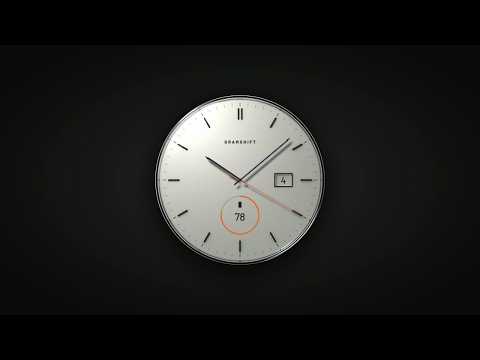
Plainhour is a clean, minimal analog watch face for Wear OS that you can read at a glance: slim polished hands, twelve applied markers, the date at 3 o'clock and one complication at 6.
Free, with no ads and no in-app purchases.
WHAT YOU GET
• A minimal dial with twelve polished applied markers (a double marker at 12), a fine minute track and a smooth sweeping seconds hand in orange
• Dial colors: Chalk, Graphite, Navy. Chalk has a fine matte finish with dark polished hands; Graphite and Navy have a sunray finish with satin steel hands
• The date in a framed window at 3 o'clock, printed in the dial's own color
• One complication slot you can change, Bottom, inside the ring at 6. It starts with the battery level, and you can pick another data source, such as steps or heart rate
• Always-on mode: the hour and minute hands with the twelve markers stay on a black screen, so you can check the time without waking the watch
HOW TO INSTALL
Install it from Play Store on your phone and choose your watch in the install menu, or open Play Store on your watch. It can take a few minutes to arrive on the watch. Then touch and hold your current watch face, swipe to the end and tap + to add Plainhour (the steps may differ slightly by watch). On a Galaxy Watch you can also choose it in the Galaxy Wearable app on your phone, under Watch faces.
Step-by-step pictures and fixes: https://gramshift.com/art/help/
Can't find it on your watch? Write to contact@gramshift.com.
HOW TO CUSTOMIZE
1. Touch and hold the watch face.
2. Tap Customize (the gear or pencil icon).
3. Swipe to Dial or Complications and pick what you want.
COMPATIBILITY
Made with the Watch Face Format for watches on Wear OS 4 or later (for example Pixel Watch and Galaxy Watch4 or newer). The design is round: on a square screen it shows as a circle with black corners.
MORE WATCH FACES FROM GRAMSHIFT ART
• Lap Ring: digital watch face with a lap ring
• Hearth: tourbillon watch face with an open heart
• Arcline: hybrid watch face, hands with digital data
• Overdrive: car dashboard watch face
• Cathode: nixie tube watch face
• Reefline: diver watch face
• Selenis: moon phase dress watch face
Find them all on our developer page in Play Store, or at https://gramshift.com/art/
LIMITATIONS
• The date shows the day of the month only, not the weekday or the month.
• What the complication shows (battery, steps, heart rate, weather and so on) comes from your watch and the apps installed on it. If a data source is missing on your watch, choose another one in Customize.
• The complication, the date and the seconds hand are hidden in always-on mode.
• The word printed on the dial (GRAMSHIFT) stays as it is in every language. The complication value follows your watch's settings.
• Wear OS 3 and older watches cannot install it.
If something does not work as expected, write to contact@gramshift.com and we will help.
Free, with no ads and no in-app purchases.
WHAT YOU GET
• A minimal dial with twelve polished applied markers (a double marker at 12), a fine minute track and a smooth sweeping seconds hand in orange
• Dial colors: Chalk, Graphite, Navy. Chalk has a fine matte finish with dark polished hands; Graphite and Navy have a sunray finish with satin steel hands
• The date in a framed window at 3 o'clock, printed in the dial's own color
• One complication slot you can change, Bottom, inside the ring at 6. It starts with the battery level, and you can pick another data source, such as steps or heart rate
• Always-on mode: the hour and minute hands with the twelve markers stay on a black screen, so you can check the time without waking the watch
HOW TO INSTALL
Install it from Play Store on your phone and choose your watch in the install menu, or open Play Store on your watch. It can take a few minutes to arrive on the watch. Then touch and hold your current watch face, swipe to the end and tap + to add Plainhour (the steps may differ slightly by watch). On a Galaxy Watch you can also choose it in the Galaxy Wearable app on your phone, under Watch faces.
Step-by-step pictures and fixes: https://gramshift.com/art/help/
Can't find it on your watch? Write to contact@gramshift.com.
HOW TO CUSTOMIZE
1. Touch and hold the watch face.
2. Tap Customize (the gear or pencil icon).
3. Swipe to Dial or Complications and pick what you want.
COMPATIBILITY
Made with the Watch Face Format for watches on Wear OS 4 or later (for example Pixel Watch and Galaxy Watch4 or newer). The design is round: on a square screen it shows as a circle with black corners.
MORE WATCH FACES FROM GRAMSHIFT ART
• Lap Ring: digital watch face with a lap ring
• Hearth: tourbillon watch face with an open heart
• Arcline: hybrid watch face, hands with digital data
• Overdrive: car dashboard watch face
• Cathode: nixie tube watch face
• Reefline: diver watch face
• Selenis: moon phase dress watch face
Find them all on our developer page in Play Store, or at https://gramshift.com/art/
LIMITATIONS
• The date shows the day of the month only, not the weekday or the month.
• What the complication shows (battery, steps, heart rate, weather and so on) comes from your watch and the apps installed on it. If a data source is missing on your watch, choose another one in Customize.
• The complication, the date and the seconds hand are hidden in always-on mode.
• The word printed on the dial (GRAMSHIFT) stays as it is in every language. The complication value follows your watch's settings.
• Wear OS 3 and older watches cannot install it.
If something does not work as expected, write to contact@gramshift.com and we will help.
Minimal analog Wear OS watch face with date, 3 dial colors and always-on
Updated on
Safety starts with understanding how developers collect and share your data. Data privacy and security practices may vary based on your use, region and age. The developer provided this information and may update it over time.
- No data shared with third partiesLearn more about how developers declare sharing
- No data collectedLearn more about how developers declare collection


Rated for 3+
Learn moreApp support
About the developer
GRAMSHIFT
gramshift.official@gmail.com
1-10-8, DOGENZAKA
SHIBUYA DOGENZAKA TOKYU BLDG. 2F.-C
SHIBUYA-KU, 東京都 150-0043
Japan
+81 90-7228-0791


