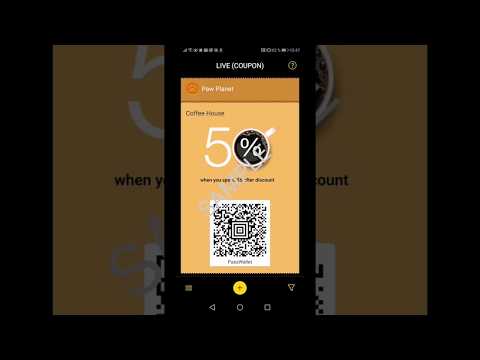

PassWallet - mobile passes
Contains adsIn-app purchases

star
45.3K reviews

Rated for 3+
info
5M+
Downloads


About this app
PassWallet is the pioneer and free app specializing in serving Android users to store, organize and update cards, in the most simple and intuitive way. PassWallet can service every type of passes imaginable: boarding passes, transport cards, passes to the movies, theatres, concerts, museums, festivals, theme parks or stadiums, loyalty cards, vouchers and discount coupons in many stores, hotel and car reservations and more!
How are passes added to PassWallet?
For your convenience, you can add and store passes in multiple ways:
✔ If you receive the passes by email or SMS, just touch the download link or the attached file and select PassWallet as your primary wallet and they are saved automatically.
✔ You can scan the barcode or QR code and your passes/cards will be automatically added to PassWallet, as well as converting to pdf without any extra coding.
✔ You can rescue/retrieve all the passes that you previously had on your device, importing them to PassWallet from Google Drive or Dropbox (where you can also back up all the new cards that you store)
✔ PassWallet is constantly evolving and improving technology, so we have incorporated NFC technology into our application, which will allow you to add, pay and redeem content as long as the issuer of your cards has adapted NFC as well, so you can enjoy this cutting-edge technology.
How does PassWallet help me organize?
🗃️ PassWallet allows you to sort your cards alphabetically, by type or by date
🏷️ With PassWallet you can modify the settings as you choose, including security and store mode, notifications, colours, category creation, etc.
🖐️ Just by touching the pass and using the icons that appear below, you can delete them, archive them, share them, see their location on the map and explore more options
🚩 Issuing companies may inform you of any changes that may occur in your cards or passes, and may update you with useful information
📡 Once you have downloaded your passes to PassWallet, you do not need a connection to use them
🔌 You will not have problems in terms of energy consumption, since PassWallet only consumes battery when it is used (no background operations are performed)
What permissions does PassWallet require to function?
You will maintain full control of the data you want to share with the card issuers. To enjoy the most useful services, PassWallet will ask you for permission to:
✔ Access your email to search for and download to PassWallet the cards/passes you receive this way
✔ Access your Files to retrieve and save in PassWallet, the passes you have saved on your device
✔ Access the camera to be able to scan barcodes in different formats to add them to your PassWallet
✔ Sending notifications and automatic card updates
✔ Know your location to show you the geolocated data of your passes
What do I do if I have a problem or need help?
For the benefit of our users, PassWallet is in a constant process of improvement and incorporation of new functionalities, so it is recommended that you update it when periodically or when prompted.
You can consult our website https://passwallet.net/index.html and if you have any technical problem you can write to us at info@passwallet.net and the PassWallet team will do our best to help you.
How are passes added to PassWallet?
For your convenience, you can add and store passes in multiple ways:
✔ If you receive the passes by email or SMS, just touch the download link or the attached file and select PassWallet as your primary wallet and they are saved automatically.
✔ You can scan the barcode or QR code and your passes/cards will be automatically added to PassWallet, as well as converting to pdf without any extra coding.
✔ You can rescue/retrieve all the passes that you previously had on your device, importing them to PassWallet from Google Drive or Dropbox (where you can also back up all the new cards that you store)
✔ PassWallet is constantly evolving and improving technology, so we have incorporated NFC technology into our application, which will allow you to add, pay and redeem content as long as the issuer of your cards has adapted NFC as well, so you can enjoy this cutting-edge technology.
How does PassWallet help me organize?
🗃️ PassWallet allows you to sort your cards alphabetically, by type or by date
🏷️ With PassWallet you can modify the settings as you choose, including security and store mode, notifications, colours, category creation, etc.
🖐️ Just by touching the pass and using the icons that appear below, you can delete them, archive them, share them, see their location on the map and explore more options
🚩 Issuing companies may inform you of any changes that may occur in your cards or passes, and may update you with useful information
📡 Once you have downloaded your passes to PassWallet, you do not need a connection to use them
🔌 You will not have problems in terms of energy consumption, since PassWallet only consumes battery when it is used (no background operations are performed)
What permissions does PassWallet require to function?
You will maintain full control of the data you want to share with the card issuers. To enjoy the most useful services, PassWallet will ask you for permission to:
✔ Access your email to search for and download to PassWallet the cards/passes you receive this way
✔ Access your Files to retrieve and save in PassWallet, the passes you have saved on your device
✔ Access the camera to be able to scan barcodes in different formats to add them to your PassWallet
✔ Sending notifications and automatic card updates
✔ Know your location to show you the geolocated data of your passes
What do I do if I have a problem or need help?
For the benefit of our users, PassWallet is in a constant process of improvement and incorporation of new functionalities, so it is recommended that you update it when periodically or when prompted.
You can consult our website https://passwallet.net/index.html and if you have any technical problem you can write to us at info@passwallet.net and the PassWallet team will do our best to help you.
Bringing mobile loyalty cards, vouchers, tickets and boarding passes for Android
Updated on
Safety starts with understanding how developers collect and share your data. Data privacy and security practices may vary based on your use, region, and age. The developer provided this information and may update it over time.


Ratings and reviews
44.6K reviews

Goop Guy
- Flag inappropriate
October 18, 2026
Doesn't work with passes, you can try and scan the codes and it claims you already have it when it doesn't. Doesn't work with QR codes from what I can tell, and Google doesn't trust it enough to allow you to connect your account, so good luck if you dare to uninstall it. Not worth the hassle

Pēteris Dzenis
- Flag inappropriate
June 30, 2026
This used to be my default app for passes. Sadly it seems that backup functionality via Dropbox or Google Drive doesn't work anymore and there is no generic way to perform export/import when switching phones. It led to losing my active passes (admittedly the situation got worse due to AOSP Files app bug, whereby moving folder out of /data resulted in completely empty folder created in target folder but original folder being deleted with all the content). Time to move on to another app.

Robert Delmont
- Flag inappropriate
- Show review history
June 20, 2026
Terribly unfriendly user interface. If it was not required by our community pool, I would not use it. You should be able to import more than one pass at a time by selecting multiple files. It should remember the last file location used. it take too many taps to perform simple functions
1 person found this review helpful
What’s new
Update to improve reliability of updates and push notifications.
App support
About the developer
Passcreator GmbH
hello@passcreator.com
Walter-Gropius-Str. 15
80807 München
Germany
+49 1511 8453264


