
1C Big Keyboard
Contains adsIn-app purchases

star
24.7K reviews

Rated for 3+
info
5M+
Downloads


About this app
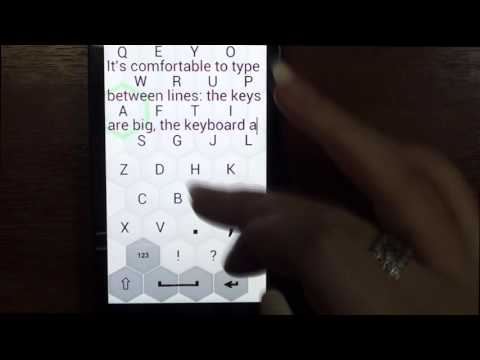
I am 58 and my vision is far from perfect. I have fingers on my hands - not matchsticks, so I designed this keyboard for myself. If you’re under 35 and have no problems with vision, please do not install. You will need it later. But maybe it will be a good lifehack for your parents now.
This ergonomic keyboard for Android allows using 100% of your phone’s screen for big keys making it indispensable on small screen devices and for fat fingers (100% is not an advertising slogan: it is literally 100%). Swipe up to switch into 100% display mode.
This big keyboard preserves your vision and reduces eye strain.
Big keyboard keys are easier to hit – less typos.
The layout of this large keyboard for Android is easy to learn – it’s a QWERTY keyboard smartly compressed into extra large keyboard, what makes it ideal for large hands.
This ergonomic keyboard for Android allows using 100% of your phone’s screen for big keys making it indispensable on small screen devices and for fat fingers (100% is not an advertising slogan: it is literally 100%). Swipe up to switch into 100% display mode.
This big keyboard preserves your vision and reduces eye strain.
Big keyboard keys are easier to hit – less typos.
The layout of this large keyboard for Android is easy to learn – it’s a QWERTY keyboard smartly compressed into extra large keyboard, what makes it ideal for large hands.
Lifehack for seniors
Updated on
Safety starts with understanding how developers collect and share your data. Data privacy and security practices may vary based on your use, region, and age. The developer provided this information and may update it over time.


Ratings and reviews
23.6K reviews

A Google user
- Flag inappropriate
- Show review history
April 10, 2019
A must for us cursed with hammer thumbs. Wide keys (not merely tall) and the option to make the letters blaze orange if you like (if you have failing eyesight to go with your hammer thumbs). The ads are annoying, but then again, they're supposed to be. 10 bucks is steep, the devs know this, which is why they allow you to 'rent' it at 2 dollars for 3 months. The typing speed is a wee-bit sluggish, and some symbols are missing (like dollar signs). Yet, I've never texted quicker
219 people found this review helpful
A Google user
- Flag inappropriate
- Show review history
April 15, 2020
I liked this app at first, but lm extremely disappointed ln their failure to fix some of the obvious shortcomings. One, seen above, is that it doesn't recognize contractions, so you have to go to the 123 screen to insert an apostrophe. The worst, though, is that if you enter "i", it autocorrects to "it", rather than "I". That is totally idiotic programming!
430 people found this review helpful
Mahjong Brain Puzzles
May 1, 2019
Sometimes it is happens. Please try:
1) Open settings (long press on SPACE and then chose GEAR icon)
2) In case in settings still appear TURN OFF ADDS – press it (you will not be billed once more – it will help to reinstall your purchase in Google store.)
3) In case it will not help please write to us – we will find a way to solve your problem.
A Google user
- Flag inappropriate
October 18, 2019
I bought a phone that has a common fault - it won't recognise touches on the very edges of the screen properly. The built-in keyboard worked fine...if you never use the spacebar, the backspace key or the letter p. It literally took the P. I downloaded this app and set it all up in about two mins. Problem solved! All keystrokes now register. Every lovely letter works once more. Many thanks! It was driving me insane.
130 people found this review helpful
What’s new
Improved custom keys in landscape mode.
App support
About the developer
GAMOS MOBILE LIMITED
support@gamosmobile.com
PAPACHRISTOFOROU BUILD., Floor 4, 32 Kritis
Limassol 3087
Cyprus
+357 94 545367


