
Home Security Camera WardenCam
Contains adsIn-app purchases

star
61K reviews

Rated for 3+
info
10M+
Downloads


About this app
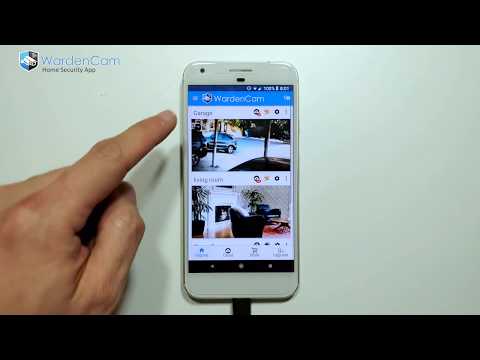
WardenCam turns your spare smartphones and tablets into home security cameras that you can watch while you are away. You can view live streaming, and past events through motion captured recordings. WardenCam can help you find out if your package arrived, help check on your loved ones health and safety, or find out what your pets are up to.
Getting Started: Install the Free WardenCam App on your phone and your spare android devices. In the App, set your spare device to "Camera" mode, sign in with your Google Account, and place your device where you want to watch. In your phone's WardenCam App, set it to "Viewer" Mode, sign in with the same Google Account, and that’s it! Please Log in with the same Google account, that's how the 2 devices can find each other. You are now connected to your loved ones. With WardenCam's motion detection feature and Google Drive and Dropbox integration, you can enjoy peace of mind without keeping a constant eye on things.
FEATURES
- Works anywhere with WiFi, 3G, 4G, and LTE
- Motion detection & alerts (push notification and email)
- Free cloud storage (directly to your Google Drive or Dropbox)
- Replay recordings, to see what you missed
- Setup multiple cameras all in one system
- Live streaming all day and night
- Talk and listen from the viewer console to any of the cameras
VIDEO MONITORING 24/7: Install WardenCam on your spare devices and pocket phone. Sign in with any gmail account as "camera" & "viewer". Place the spare device anywhere of interest at home, in the kitchen, the garage, your office. Monitor live on the pocket phone anywhere with internet.
MOTION DETECTION: Enjoy peace of mind without keeping a constant eye on things. WardenCam provides automated motion detection schedule. Once a motion is detected, it starts siren alarm to scare the intruder away. Link your Google Drive and Dropbox on both the camera and viewer so that WardenCam can also upload the motion video to your cloud storage. You may even enable 24/7 recording to cloud. Simple and secure!
CLOUD STORAGE: All videos are stored directly to your personal cloud storage in Google Drive or Dropbox. You can sign up for free and use GBs of Free Cloud Storage with Wardencam. We never analyze and store your data on our WardenCam servers.
RECEIVE ALERT: Receive a push notification immediately when an intruder is detected, or your elderly relatives are moving about their day. Play back event recordings from the cloud storage.
TWO-WAY AUDIO: Talk while watching the live streaming. Send voice to the camera device. Prevent a negative action before it ever happens
Upgrade:
If you like to use the app for 24/7 video monitoring, please upgrade to premium version with one single payment of USD $5.99. No monthly fee! Visit our website wardencam360.com for more details.
Follow us on facebook to get more user tips from developer!
https://www.facebook.com/WardenCam360
Getting Started: Install the Free WardenCam App on your phone and your spare android devices. In the App, set your spare device to "Camera" mode, sign in with your Google Account, and place your device where you want to watch. In your phone's WardenCam App, set it to "Viewer" Mode, sign in with the same Google Account, and that’s it! Please Log in with the same Google account, that's how the 2 devices can find each other. You are now connected to your loved ones. With WardenCam's motion detection feature and Google Drive and Dropbox integration, you can enjoy peace of mind without keeping a constant eye on things.
FEATURES
- Works anywhere with WiFi, 3G, 4G, and LTE
- Motion detection & alerts (push notification and email)
- Free cloud storage (directly to your Google Drive or Dropbox)
- Replay recordings, to see what you missed
- Setup multiple cameras all in one system
- Live streaming all day and night
- Talk and listen from the viewer console to any of the cameras
VIDEO MONITORING 24/7: Install WardenCam on your spare devices and pocket phone. Sign in with any gmail account as "camera" & "viewer". Place the spare device anywhere of interest at home, in the kitchen, the garage, your office. Monitor live on the pocket phone anywhere with internet.
MOTION DETECTION: Enjoy peace of mind without keeping a constant eye on things. WardenCam provides automated motion detection schedule. Once a motion is detected, it starts siren alarm to scare the intruder away. Link your Google Drive and Dropbox on both the camera and viewer so that WardenCam can also upload the motion video to your cloud storage. You may even enable 24/7 recording to cloud. Simple and secure!
CLOUD STORAGE: All videos are stored directly to your personal cloud storage in Google Drive or Dropbox. You can sign up for free and use GBs of Free Cloud Storage with Wardencam. We never analyze and store your data on our WardenCam servers.
RECEIVE ALERT: Receive a push notification immediately when an intruder is detected, or your elderly relatives are moving about their day. Play back event recordings from the cloud storage.
TWO-WAY AUDIO: Talk while watching the live streaming. Send voice to the camera device. Prevent a negative action before it ever happens
Upgrade:
If you like to use the app for 24/7 video monitoring, please upgrade to premium version with one single payment of USD $5.99. No monthly fee! Visit our website wardencam360.com for more details.
Follow us on facebook to get more user tips from developer!
https://www.facebook.com/WardenCam360
Turn old phones to home security cameras with Motion Detection & Cloud Recording
Updated on
Safety starts with understanding how developers collect and share your data. Data privacy and security practices may vary based on your use, region, and age. The developer provided this information and may update it over time.
- This app may share these data types with third partiesPersonal info, Messages and 5 others
- No data collectedLearn more about how developers declare collection
- Data isn’t encrypted
- Data can’t be deleted


Ratings and reviews
56.2K reviews

Ching ching check ing Todo
- Flag inappropriate
December 19, 2020
If you are looking for a surveillance system, look no further than wardencam! Put your old phones to use again by using their cameras to watch over your belongings. I have never run out of space on my drive storage and have even left my cameras on for continuous recording for several days in a row! Plus, you only pay one flat, affordable fee to have access to a solid surveillance system. Highly recommend!
3 people found this review helpful

Boris Siber
- Flag inappropriate
March 7, 2021
2014. - I have spent a lot of time checking all available surveillance apps, and this one is the best at the moment. Only thing that is missing is possibility to choose frame rate for each video resolution (depending on network quality, android spec., etc.). Keep on good work, you're on the right path :) ...5 years later - still no option to choose frame rate, mostly cca. 3-5 fps. Pity, 'cause it's still one of the best apps, worth money.
19 people found this review helpful

WISDOM LAKE
- Flag inappropriate
January 29, 2024
I'm from India. I liked the app and purchased a license. The concern is there are no regular updates even when there are a lot of technical issues in the app. The last update was in July 2023 in which the issues were still not fixed. The app is extremely slow. Seems like I made a mistake by paying for it in 2017. Such unreliability encourages people to not pay for licenses or resort to ad-based apps. Hope you will take note of this and let the app be a competitive solution in ip cam segment.
6 people found this review helpful
WardenCam360 - Home Security, Video Monitoring
December 21, 2016
Hi Hitesh. There is a row of 4 buttons on the sign in screen. If you press the upgrade button (4th button) on the sign in screen, you should see the google in app purchase dialog.
Please email support@wardencam360.com. We can help you.
Could you please give us a couple more stars? That means a lot to us. Thank you very much.
What’s new
Improved reliability and a few bug fixes
App support
About the developer
Hongbin Li
wardencam360@gmail.com
41012 Ramon Terrace
Fremont, CA 94539-4436
United States


