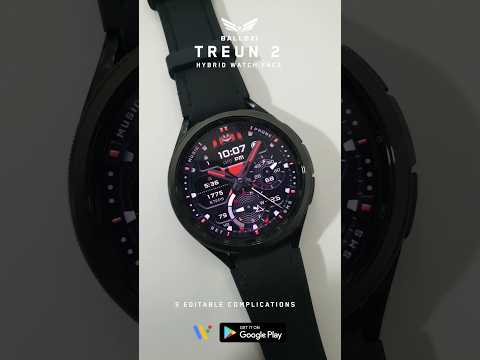

Ballozi TREUN 2 Hybrid Analog


Rated for 3+
info
1K+
Downloads

Rated for 3+
Learn more


About this app
Ballozi TREUN 2 is a hybrid analog watch face for Wear OS. It is the second version of Ballozi Treun.
⚠️ NOTICE of Device Compatibility:
This is a Wear OS app and is only compatible with smartwatches running Wear OS 5.0 or higher (API level 34+)
FEATURES:
- Analog/Digital watch face switchable to 12H/24H via phone settings
- Battery progress subdial with red indicator at 15% and below
- Steps counter (default editable complication)
- 10x Background styles
- 10x Color accent for hands and index markers
- 13x stripe colors with a disabled option by a single tap in the center
- Date and day of week
- 10x Multilanguage on DOW
- Moon phase type
- 3x Editable complications
- 4x Customizable app shortcuts (no icon)
- 8x Preset app shortcuts
- 3x AOD options
CUSTOMIZATION:
1. Press and hold "Display" then hit "Customize."
2. Swipe left and right to choose what to customize.
3. Swipe up and down to choose options available.
4. Hit "OK."
PRESET APP SHORTCUTS:
1. Music
2. Alarm
3. Phone
4. Battery Status
5. Heart rate
6. Calendar
7. Settings
8. Messages
CUSTOMIZABLE APP SHORTCUTS
1. Press & hold display then Customize
3. Find Complication, and single tap to set the preferred app in the shortcuts.
Check out Ballozi's updates at:
Facebook page: https://www.facebook.com/ballozi.watchfaces/
Instagram: https://www.instagram.com/ballozi.watchfaces/
Youtube Channel: https://www.youtube.com/@BalloziWatchFaces
Pinterest: https://www.pinterest.ph/ballozi/
For support, you can email me at balloziwatchface@gmail.com
⚠️ NOTICE of Device Compatibility:
This is a Wear OS app and is only compatible with smartwatches running Wear OS 5.0 or higher (API level 34+)
FEATURES:
- Analog/Digital watch face switchable to 12H/24H via phone settings
- Battery progress subdial with red indicator at 15% and below
- Steps counter (default editable complication)
- 10x Background styles
- 10x Color accent for hands and index markers
- 13x stripe colors with a disabled option by a single tap in the center
- Date and day of week
- 10x Multilanguage on DOW
- Moon phase type
- 3x Editable complications
- 4x Customizable app shortcuts (no icon)
- 8x Preset app shortcuts
- 3x AOD options
CUSTOMIZATION:
1. Press and hold "Display" then hit "Customize."
2. Swipe left and right to choose what to customize.
3. Swipe up and down to choose options available.
4. Hit "OK."
PRESET APP SHORTCUTS:
1. Music
2. Alarm
3. Phone
4. Battery Status
5. Heart rate
6. Calendar
7. Settings
8. Messages
CUSTOMIZABLE APP SHORTCUTS
1. Press & hold display then Customize
3. Find Complication, and single tap to set the preferred app in the shortcuts.
Check out Ballozi's updates at:
Facebook page: https://www.facebook.com/ballozi.watchfaces/
Instagram: https://www.instagram.com/ballozi.watchfaces/
Youtube Channel: https://www.youtube.com/@BalloziWatchFaces
Pinterest: https://www.pinterest.ph/ballozi/
For support, you can email me at balloziwatchface@gmail.com
A modern sporty hybrid watch face for Wear OS designed by BALLOZI
Updated on
Safety starts with understanding how developers collect and share your data. Data privacy and security practices may vary based on your use, region, and age. The developer provided this information and may update it over time.
- No data shared with third partiesLearn more about how developers declare sharing
- No data collectedLearn more about how developers declare collection


What’s new
- Updated to support Android 15 (API level 35) or higher
Rated for 3+
Learn moreApp support
About the developer
Mario D. Paladin Jr.
balloziwatchface@gmail.com
Block 2 Lot 5, Mabilis Street
Diamond Jubilee Ville Subd
Masaya Bay, Laguna
4033
Philippines


