
LACUNA Weather Watch Face


Rated for 3+
info
0+
Downloads

Rated for 3+
Learn more


About this app
A world beneath the dial.
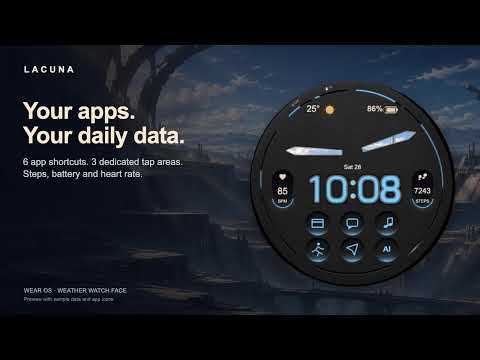
LACUNA is a weather watch face for Wear OS with a sculpted graphite dashboard and a hidden architectural landscape. Digital time, recessed indicators and customizable app shortcuts bring information into a distinctive design.
TAP TO REVEAL THE LANDSCAPE
Tap the upper dial to open the weather panorama. Tap again to close it. In Cutout mode, the scenery remains visible through the time digits and the two continuous, sculpted indicators.
CUTOUT OR SOLID TIME
Choose your preferred Time style:
• Cutout + contrast: see the landscape through the digits, with defined edges and added contrast.
• Solid: filled digits for a clearer reading, colored by your chosen theme.
Five theme colors are available: ivory, amber, blue, ice and coral. The theme also colors app icons. Lighting and the health, activity/battery and weather indicators have separate color choices, including Off for their lights.
30 WEATHER ATMOSPHERES
Discover 15 weather conditions with separate day and night artwork: clear, sunny, cloudy, partly cloudy, fog, mist, light rain, rain, heavy rain, light snow, snow, heavy snow, sleet, thunderstorms and wind.
Animated rain, snow and wind add movement to the active scene. Artistic lighting shifts through morning, sunset, evening, deep night and predawn. Available weather data determines the day or night scene.
A moving sun, a moon that reflects the current lunar phase in suitable nighttime skies, subtle stars and daytime atmospheric effects complete the landscape. Sky paths and lighting transitions are artistic.
The temperature and changing weather icon stay visible on the main dial. Dedicated light bars indicate UV level and the chance of rain when these data are available.
INFORMATION WITH DEPTH
The left sculpted pointer responds to heart rate. The right follows progress toward your daily step goal. These are data indicators; the central digital display tells the time.
Recessed bars show heart rate, step progress and battery level. A fast, seconds-driven scanner sweeps through the lower channels, passing beneath the metal bridges between openings.
AT A GLANCE, ONE TAP AWAY
• Digital time in the watch's 12/24-hour format
• Date
• Heart rate in BPM
• Daily steps and step-goal progress
• Watch battery percentage
• Temperature and current weather condition
• UV and rain-probability indicators
Three dedicated tap areas on the steps, battery and heart-rate displays open their corresponding screens on your watch.
SIX APPS OF YOUR CHOICE
Six configurable app shortcuts sit inside the recessed circular buttons. Select compatible apps installed on your watch, such as music, messaging, navigation, wallet, health or AI apps. Icons come from the selected apps and follow the theme color. Apps are not included with the watch face.
WEATHER IN ALWAYS-ON DISPLAY
The minimalist AOD keeps the outline time and date above a black background, with a thin-line landscape and no surrounding frame. It changes between 15 daytime and 15 nighttime weather atmospheres. Sun, moon, stars, clouds and precipitation are represented by static line art, selected to match the available weather data.
COMPATIBILITY AND DATA
Designed for compatible smartwatches running Wear OS 5 or later. Weather and health information, app choices and tap destinations depend on your watch, installed apps, data providers and permissions. Values update according to the watch's data sources. Animations run in the active display; AOD uses static weather artwork.
Weather landscapes, cutout or solid time, app shortcuts and a weather-aware AOD
Updated on
Safety starts with understanding how developers collect and share your data. Data privacy and security practices may vary based on your use, region, and age. The developer provided this information and may update it over time.
- No data shared with third partiesLearn more about how developers declare sharing
- No data collectedLearn more about how developers declare collection
- Committed to follow the Play Families Policy


What’s new
Release of the LACUNA companion app.
• Explore LACUNA with an eight-image gallery.
• Discover its features and customisation options.
• Follow the guide to install the watch face on your Wear OS watch.
• Browse the Demand Group watch face collection.
Rated for 3+
Learn moreApp support
phone
Phone number
+393758418466
About the developer
MANDOLESI LUCA
sviluppo@smokeandthink.com
VIA MARIO FASCETTI 58
00136 ROMA
Italy
+39 327 117 1573


